
Redeem guide
How to Use & Activate a Visa Vanilla Gift Card
Register a billing ZIP, then spend it anywhere US Visa debit is accepted
A Vanilla Visa is a prepaid Visa card, not a code you redeem into an account. Register a name and ZIP at vanillagift.com so online and phone orders pass address checks, then spend the balance in store, online, or by phone.
Code format
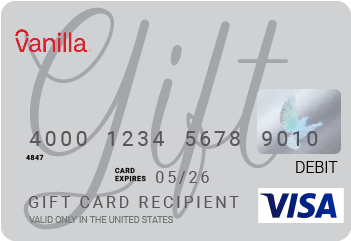
Quick Answer: Using Your Vanilla Visa Gift Card
A Vanilla Visa is a prepaid Visa card, not a code you redeem into an account — there is no “gift card account” to log in to. Register a billing name and ZIP code at vanillagift.com so online and phone orders pass address verification, then spend the 16-digit card anywhere US Visa debit is accepted: in stores, online, or over the phone. The balance lives on the card itself and is ready to spend immediately.
How to Activate and Spend Your Vanilla Visa Gift Card
A Vanilla Visa works in three stages: register the card with a billing ZIP so address checks pass, then spend it in store, online, or by phone. The balance is already loaded on the card — there is no wallet to fund — and it spends anywhere US Visa debit cards are accepted in the United States and the District of Columbia. Your card from MyGiftCardSupply arrives as a 16-digit number, expiration date, and CVV by email, so it is active on delivery and does not need an activation phone call.
Register the Card Online (Set a Billing ZIP)
Do this first. A Vanilla Visa ships with no billing address on file, and most online and phone checkouts compare the ZIP you type against the one registered to the card. Registering a name and ZIP is what lets those orders go through.
- Go to vanillagift.com and open Manage Card with your 16-digit card number, expiration date, and CVV ready.
- Open the billing or Personalize Your Card section and enter your name and ZIP code.
- Save the details and note the exact ZIP you used — you must enter that same ZIP at checkout every time.
- If you are outside the United States, connect to a US VPN before registering, since the card is limited to the US and the District of Columbia.
If your physical card asked for activation, you can also activate it by calling the toll-free number on the back, 1-833-322-6760 — a digital card delivered by MyGiftCardSupply is already active, so you skip straight to registering the ZIP.
Spend It in a Store
In person, a Vanilla Visa behaves like any Visa card. Use this when you are at a register and your purchase total fits within the balance.
- Insert, tap, or swipe the card at the terminal, or add it to Apple Pay, Google Pay, or Samsung Pay for contactless checkout.
- Choose Credit when prompted — there is no preset PIN, though you can set a 4-digit PIN the first time you use the keypad.
- If the total is more than your balance, tell the cashier exactly how much to charge to the card and pay the rest with another method.
Avoid pay-at-the-pump fuel and restaurant or hotel terminals that pre-authorize more than the final charge — see the troubleshooting section for why these decline a card that has enough money on it.
Spend It Online or by Phone
Online and phone orders are where the registered ZIP matters most. Treat the card as a standard Visa, not as a store gift card.
- At checkout, enter the 16-digit card number, expiration date, and CVV in the Credit or Debit card field — not a separate “Gift Card” field.
- Enter the billing ZIP code you registered, exactly as you saved it, so the address check passes.
- Confirm the order total — including tax and shipping — is at or below your remaining balance before you submit.
- For a phone or mail order, read the same card number, expiration, CVV, and registered ZIP to the merchant.
Do not use a Vanilla Visa for subscriptions or other recurring billing, and note it cannot be used at ATMs — it is built for one-time purchases.
What You Can Buy with a Vanilla Visa Gift Card
A Vanilla Visa is not tied to one retailer, so it spends like cash anywhere US Visa debit is accepted: grocery and department stores, restaurants, online retailers, and most checkout pages that take a Visa card. You can also load it into Apple Pay, Google Pay, or Samsung Pay for tap-to-pay. Unlike a store-branded card, it is not locked to a single brand’s catalog.
It is not, however, a bank card. A Vanilla Visa cannot be used at ATMs, for recurring subscriptions, or for international purchases — it works in the United States and the District of Columbia only. There is also no way to reload it; once the balance reaches zero, the card is spent.
- Use it for: one-time in-store, online, and phone purchases anywhere US Visa debit is accepted, including contactless wallets.
- Won’t work for: ATMs, recurring subscriptions, reloading, or purchases outside the US.
Why Your Vanilla Visa Gift Card Isn’t Working
A Vanilla Visa that shows a full balance can still be declined, and the reason is almost never an “invalid code.” Match what happened to one of the cases below — most are about address verification or how a merchant holds funds, not the card itself.
The billing ZIP doesn’t match (online declines)
This is the most common online failure. If you never registered the card, or the ZIP you typed at checkout does not match the ZIP saved to the card, the address check fails and the order is declined. Register the card at vanillagift.com, then enter that exact same ZIP every time you pay online or by phone.
The purchase is larger than the balance
A Vanilla Visa cannot cover part of a charge automatically — if the total, including tax and shipping, is more than the remaining balance, the whole transaction is declined. In a store, tell the cashier how much to put on the card and pay the difference another way. Many online checkouts do not support this split, so keep the order at or below your balance.
Declined at a gas pump, restaurant, or hotel
These merchants pre-authorize more than your final charge: a fuel pump may hold around $75 to $100, a restaurant adds roughly 20% for a tip, and a hotel holds the estimated stay plus up to about 30% for incidentals. If your balance is below that hold, the card is declined even though the real charge would fit. Pay inside and ask the attendant to charge a specific amount, and avoid using the card for hotel or rental deposits.
Entered in the wrong field, or as the wrong card type
At an online checkout, enter the card in the Credit or Debit field, not a separate “Gift Card” field meant for store-branded cards. In a store, choose Credit — a Vanilla Visa has no preset debit PIN unless you set one on the keypad. Using the wrong field or card type is a frequent cause of an otherwise-good card being refused.
Where to Buy a Vanilla Visa Gift Card Online
Shoppers come back for another Vanilla Visa when they have spent the first card down to zero, want a flexible Visa balance without a bank card on file, or need a prepaid card they can use across many stores at once. Because the balance lives on the card rather than in an account, a fresh card is the simplest way to get more spendable Visa value.
Buy a Vanilla Visa gift card online from MyGiftCardSupply — it is delivered by email as a 16-digit card number, expiration date, and CVV, usually within a few minutes, so you can register the ZIP and start spending the same day. The same delivery link lets you check the loaded balance whenever you need it.
Sources
Vanilla Gift — Frequently Asked Questions, Vanilla Gift — How to use a Vanilla Visa online, Vanilla Gift — Check your balance, vanillagift.com — Manage card.
Vanilla Visa Gift Card FAQ
Need another Prepaid Visa Vanilla Gift Card?
Codes delivered by email within minutes. Same checkout, same account, same redemption flow you just read about.
Buy a Prepaid Visa Vanilla Gift Card →
